



I’ve been a fan of sequences ever since they were added in SQL Server 2012. Prior to that, developers had a choice of IDENTITY columns or a roll-your-own table mechanism.
What are sequences in SQL Server?
Sequences allow us to create a schema-bound object that is not associated with any specific table.
For example, if I have a Sales.HotelBookings table, a Sales.FlightBookings table, and a Sales.VehicleBookings table, I might want to have a common BookingID used as the key for each table. If more than the BookingID was involved, you could argue that there is a normalization problem with the tables, but we’ll leave that discussion for another day.
Another reason I like sequences is that they make it much easier to override the auto-generated value, without the need for code like SET IDENTITY_INSERT that we need with IDENTITY columns. This is particularly powerful if you ever need to do this across linked servers, as you’ll quickly find out that it doesn’t work.
Sequences let me avoid these types of issues: they perform identically to IDENTITY columns, and they also give me more control over the cache for available values.
Exploring an issue not obvious to most people
I felt there was a problem with how some of the code associated with sequences was implemented. It worked as documented, but wasn’t useful. Let me show you why. We’ll start by creating a schema and a sequence:
|
1 2 3 4 5 6 7 8 9 10 11 12 |
USE tempdb; GO CREATE SCHEMA Sales AUTHORIZATION dbo; GO CREATE SEQUENCE Sales.BookingID AS bigint START WITH 1 INCREMENT BY 1 CACHE 100; GO |
We could then use this schema as the default value for each of the three tables:
|
1 2 3 4 5 6 7 8 9 10 11 12 13 14 15 16 17 18 19 20 21 22 23 24 25 26 |
CREATE TABLE Sales.FlightBookings ( BookingID bigint NOT NULL CONSTRAINT PK_Sales_FlightBookings PRIMARY KEY CONSTRAINT DF_Sales_FlightBookings_BookingID DEFAULT (NEXT VALUE FOR Sales.BookingID), ... ); CREATE TABLE Sales.HotelBookings ( BookingID bigint NOT NULL CONSTRAINT PK_Sales_HotelBookings PRIMARY KEY CONSTRAINT DF_Sales_HotelBookings_BookingID DEFAULT (NEXT VALUE FOR Sales.BookingID), ... ); CREATE TABLE Sales.VehicleBookings ( BookingID bigint NOT NULL CONSTRAINT PK_Sales_VehicleBookings PRIMARY KEY CONSTRAINT DF_Sales_VehicleBookings_BookingID DEFAULT (NEXT VALUE FOR Sales.BookingID), ... ); |
All this is as expected. However, one question often arises: how do I know the last value for a given sequence? The answer provided by the documentation at the time was to query the sys.sequences view. We could do this as follows:
|
1 2 3 4 5 |
SELECT s.current_value FROM sys.sequences AS s WHERE SCHEMA_NAME(s.schema_id) = N'Sales' AND OBJECT_NAME(s.object_id) = N'BookingID'; GO |
The current_value column in sys.sequences is defined as follows:
|
1 |
Datatype: sql_variant NOT NULL |
The use of sql_variant here makes sense as the view needs to be able to provide the current value for all sequences, regardless of data type. Sequences can be created with any built-in integer type. According to the documentation, the possible values are:
- tinyint – Range 0 to 255
- smallint – Range -32,768 to 32,767
- int – Range -2,147,483,648 to 2,147,483,647
- bigint – Range -9,223,372,036,854,775,808 to 9,223,372,036,854,775,807
- decimal and numeric with a scale of 0.
- Any user-defined data type (alias type) that is based on one of the allowed types.
The output of the current_value column is described as:
The last value obligated. That is, the value returned from the most recent execution of the NEXT VALUE FOR function or the last value from executing the sp_sequence_get_range procedure.
However, it also says: Returns the START WITH value if the sequence has never been used. That’s a problem – but why?
Fast, reliable and consistent SQL Server development…
The problem with how the sequence is defined in SQL Server
If you haven’t retrieved a value from the sequence, there is no last value. What it returns is the first value generated – but this hasn’t happened yet:
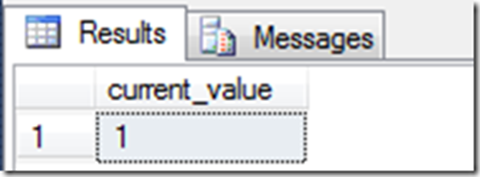
The documentation was correct, but the behavior was bizarre. In this situation, I believe this column should have returned NULL. Otherwise, there was no way to tell that this value has not yet been generated.
If I generated a new value and then queried it again i.e:
|
1 2 3 4 5 6 7 |
SELECT NEXT VALUE FOR Sales.BookingID; SELECT c.current_value FROM sys.sequences AS s WHERE SCHEMA_NAME(s.schema_id) = N'Sales' AND OBJECT_NAME(s.object_id) = N'BookingID'; GO |
…the same value was returned:
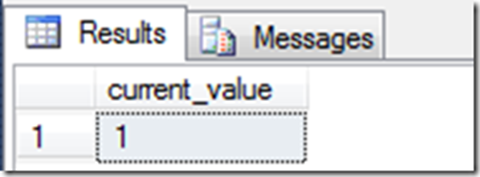
So, even though the state of the sequence had changed, there was no change in the current_value column. It was only when I requested it another time, that I saw the expected value:
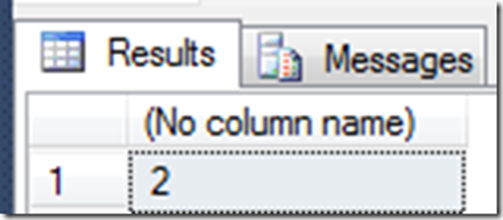
So, the problem was that when you read the current value from the sys.sequences view, there was no way to know if this was the last value obligated or the next one to be used.
I really wanted to see this behavior changed. That column should have returned NULL when it’s first set up, not the start value.
But it was fixed!
Back in 2016, I posted about how I thought this was broken. I also mentioned that, given the SQL Server team’s aims for backwards compatibility, it was unlikely that they would fix it.
Instead, I hoped they’d add another column to sys.sequences – one that somehow indicated that the sequence has never been used, even though that felt like a hack instead of a bug fix. There was already a column for is_exhausted, so they already had a state-tracking column. I hoped they’d just add another one.
Well, the great news is that this was fixed in SQL Server 2017, even though I didn’t hear anyone mention it, and I don’t even recall seeing anyone writing about it. And even better than an extra state-tracking column, the team added a new last_used_value column that works the way I expected current_value to have worked.
So, the message here is: if you want to check the last value issued by a sequence, do not use current_value. It’s now a pointless column. Instead, use the last_used_value column. It works as expected. I’m not sure who it was on the product team that fixed this, but thank you!
FAQs: How to determine the last value used by a sequence in SQL Server
1. What is a sequence in SQL Server?
A SQL Server sequence is a schema-bound object that generates numeric values independently of any table. It’s useful when multiple tables need a common key, like BookingID for FlightBookings, HotelBookings, and VehicleBookings.
2. How is a sequence different from an IDENTITY column in SQL Server?
-
SQL Server sequences are not tied to a specific table.
-
You can override the next value easily without
SET IDENTITY_INSERT. -
They allow more control over caching and value generation.
3. How do I create and use a sequence in SQL Server?
Use the following code:
CREATE SEQUENCE Sales.BookingID AS bigint START WITH 1 INCREMENT BY 1 CACHE 100;
CREATE TABLE Sales.FlightBookings (
BookingID bigint DEFAULT (NEXT VALUE FOR Sales.BookingID)
PRIMARY KEY,...);4. How do I check the last value issued by a sequence in SQL Server?
Do not use current_value – it may return the start value even if no value has been generated. Instead, use last_used_value in SQL Server 2017+ for accurate results.
5. Why use sequences in SQL Server?
-
Share a numeric key across multiple tables.
-
Easily control and override values.
-
Avoid limitation issues with
IDENTITYacross servers.
This document contains proprietary information and is protected by copyright law.
Copyright © 2026 Red Gate Software Limited. All rights reserved






Load comments